

briefin turns chaotic requests into structured, actionable briefs. Built for creative teams juggling deadlines, approvals, and last-minute changes.


.svg)

Filling out a brief is usually quick. It's starting the work afterward that slows everyone down.
Every team knows the feeling. The brief gets filled in, reads clearly, gets approved, and everyone nods. Then nothing happens. Days pass because someone still has to open PowerPoint or start the Word doc and turn all that good thinking into something a client, leadership team, or production partner can use.
That gap between “the brief is done” and “the deliverable is ready” is where momentum dies. It’s where weekends disappear, versions pile up, and on-brand intentions quietly turn into off-brand realities.
briefin’s new Claude integration is built to close that gap. Not with another chatbot, and not with an “AI assistant” bolted onto the side of your workflow, but with something more useful: a teammate that reads your brief, understands your templates, and hands back a finished, on-brand deliverable you can present.
We’re calling it an output-ready briefing, and it changes the maths of creative work. Below I’ll walk through what we shipped, how it works, and how it fits the way briefing has always approached briefing: structure first, AI second.
For years, briefing tools have done one job well: capture the request. Briefin has always done that better than most, with structured templates, smart fields, and the right approvals in the right place. But capture was only ever half the story.
Once the brief is submitted, someone still has to open PowerPoint or start the Word doc and translate clear strategic thinking into a file a client or a leadership team can read. That translation step is where time and margin disappear. A brief gets sign-off, but it takes days for the first draft to be ready. That’s not because the team is brainstorming - it’s the routine admin: templates, slide masters, tracking down files, and plugging in all the basics.
Somehow, it always ends up with the same people: the strategist who knows where everything’s saved, the designer who’s already busy, the account director working late.
We’ve seen this across plenty of teams. The briefs make sense. The teams know what they’re doing. But still, time and money slip away when it’s time to go from plan to finished work.
With Claude now wired directly into briefin, the platform doesn’t stop when the brief is submitted. It picks up where the brief leaves off and generates the actual work product your team would otherwise have spent hours, or days, building by hand:
You write the brief, briefin drafts the deliverable, you refine it, and you ship. That’s the new loop.
What comes back is a real, editable file. It isn’t text in a chat window that you then have to reformat, and it isn’t a summary you have to rebuild from scratch. It’s a .pptx or .docx that opens natively in PowerPoint, Word, Keynote, Pages, or Google Workspace, and it already looks like your team made it, because in every way that matters, they did.
Three things do the work together.
1. The brief itself. Your structured briefin template covers objective, audience, tone, deliverables, deadline, and constraints, so Claude gets the strategic intent in your own words.
2. Your reference files. Attach your templates (.pptx, .docx), brand guides, past winning work, and any style references once, and briefin keeps them on hand for every brief that uses the same template. These are the visual and structural DNA of the output.
3. Claude. One of the strongest reasoning models available today, it reads the brief, works through the references, and weaves the two together into a finished draft that follows your structure and matches your style.
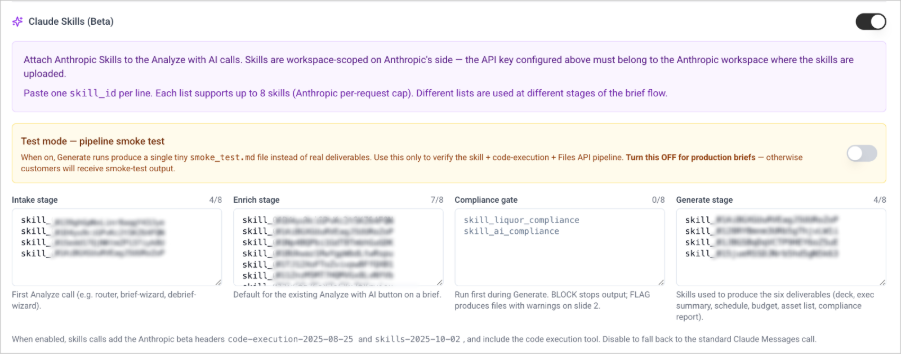
4. Your skills. This is the newest piece. briefin lets you embed Anthropic's Claude Skills directly into the brief flow. A skill is a packaged bundle of instructions and knowledge that Claude loads for a specific job, and you attach them stage by stage, so the right expertise shows up at the right moment. Some skills run the moment a brief comes in, others kick in when the deliverables are being generated.
You don’t have to prompt anything or describe what you want. The brief is the input, the reference files supply the style, and the output is a draft.
When the brief is structured, and briefin’s templates ensure it is, the draft comes out structured too. When the references are on-brand, the draft starts on-brand. The old rule about garbage in, garbage out still applies, which is why we built it into the briefing workflow rather than bolting it on elsewhere.
There’s no shortage of AI tools these days. Buttons, chatbots, and quick summaries are everywhere you look. But most of them turn out results you’d never share with a client or put in front of your exec team.
The difference with briefin’s Claude integration is that it doesn’t generate in a vacuum. It generates with context.
Compare that to a generic tool. Paste a vague request into a chatbot, ask for “a pitch deck,” and you get something confidently formatted but strategically empty. The brief’s structure isn’t there, so the AI invents its own, and its version rarely matches what the client needs. Most of these tools return text anyway, so you still have to open PowerPoint and rebuild it slide by slide.
briefin’s integration sidesteps these problems by working inside a structured briefing workflow. By the time Claude gets involved, the brief is already built, reviewed, and approved. The references are yours, and what comes back is a real file, not just a transcript. Structure comes first; AI follows.
Most agencies and in-house teams measure turnaround in days. Getting from a brief to a first draft of a presentation is, conservatively, two to four working days once calendars, revisions, and template wrangling are accounted for.
With briefin’s Claude integration, the same process takes minutes. Submit a brief before your coffee, and the draft is ready before the cup cools. Teams that can respond the same day win more often. Speed is now a competitive edge, not a compromise on quality.
A great template goes out, but give it a few months and it comes back looking unfamiliar. Fonts and logos are off, colours change, and what was once your brand now feels a bit off.
briefin fixes this at the source. Claude uses your templates, styles, and visual rules, so the deliverable starts and stays on-brand. Your design system is no longer a forgotten PDF but part of every document. For marketing leaders, this means brand consistency without constant oversight.
Most teams have one or two people who are genuinely brilliant at turning briefs into polished decks. They become indispensable, which sounds like a compliment but is really a risk. They get pulled into every pitch, every internal review, every “can you just…” request, and eventually they burn out or leave, and the bottleneck walks out with them.
briefin’s Claude integration spreads that capability across the whole team. The client themselves, a junior strategist, an account manager, or a project lead or anyone who can write a clear brief, can now produce a credible first draft of the deliverable. That frees your senior people up for the work only they can do. The org chart stays the same. The capacity doesn’t.
Picture a creative agency pitching a new retail client, with the deadline on Friday.
Monday morning. The client or strategist opens briefin and fills in a campaign brief covering objective, audience, tone, channels, key messages, deliverables, and deadline. They attach the agency’s pitch deck template and two pieces of award-winning past work for reference, then hit submit.
Monday, ninety seconds later. Claude has read the brief, understood the reference materials, and produced a draft deck: title slide, situation, strategic approach, creative territories, channel plan, timeline, and scope. The sections are styled in the agency’s template, the tone tracks the references, and the placeholders make sense.
Monday afternoon. The creative director reviews the draft, sharpens the strategic narrative, and swaps out two headlines. The designer tidies up the visuals, and the account director rewrites the closing slide in their own voice.
Tuesday morning. The deck goes for internal sign-off a full day ahead of schedule, with the team’s energy spent on thinking and craft rather than on building scaffolding by hand.
That’s not some far-off scenario. It’s a fairly ordinary Tuesday with briefin.
We’ve said this since briefin’s very first AI feature: AI is a support layer, not a substitute for thinking. That holds here too.
This matches every other AI feature in briefin. The brief provides the structure, AI builds on it, and people make the calls that matter.
We designed this with three principles in mind, for real teams rather than demo videos.
It has to respect your brand. Reference files aren’t decoration, they’re inputs. Templates, brand guides, and sample work all shape what comes out. The output isn’t an AI’s idea of a deck; it’s your deck, drafted faster.
It has to fit your workflow. briefin is already where briefs live, so adding Claude doesn’t ask your team to learn a new tool, log in somewhere else, or bounce between five browser tabs. The brief, the references, the generation, the output, the review, and the approval all happen in one place, and all of it is already familiar.
It has to produce real files. Not text in a chat window you have to reformat, and not a summary you have to rebuild, but actual .pptx and .docx files that are ready to open, edit, present, and send. That’s the kind of output your team and your clients have been expecting all along.
The integration is part of briefin’s AI Brief Intelligence feature set, available on Growing and Enterprise plans. It runs on the BYO-AI model, so teams that already have a Claude account can plug it in directly.
What this means for the business case
If you’re weighing briefin against a spreadsheet of competing tools, here’s the line that matters:
Every other briefing tool ends at the brief. briefin ends at the deliverable.
That single difference reshapes the ROI conversation. You’re no longer just paying for better intake. You’re getting:
For agencies, that adds up to more pitches per quarter and healthier margins on each one. For in-house teams, it means responding to the business at the speed at which business moves. For operations leaders, it means a workflow you can finally measure end-to-end, because the finish line now sits in the same place as the start.
The ROI from structured briefs alone is already substantial. The figure we come back to most often: 40 briefs a month at $75 an hour works out to roughly $72,000 in recoverable value a year. Layer output generation on top, and those numbers get better, and a real chunk of senior team time becomes available for higher-value work.
For as long as most of us have worked this way, the brief has marked the end of one job and the start of a long manual second one. Someone approves the thinking. Then someone else spends days turning it into a file fit to send. briefin's Claude integration removes that second job. The brief still carries the strategy, your reference files still carry the brand, and your skills still carry the rules that matter, whether compliance regulation or house style. What changes is that the finished draft now arrives in minutes instead of days.
That's a genuine shift in how creative and marketing teams work. Less time is spent rebuilding the same scaffolding and more time on the ideas and craft that actually win business. Compliance stops being a last-minute scramble and becomes something the pipeline handles on its own. The ability to ship a polished deliverable no longer lives with one or two overloaded people but spreads across the whole team.
If your team writes briefs and ships work off the back of them, this was built for you. Book a demo, bring your messiest template, and watch a real brief turn into a real, on-brand, ready-to-present file.
.svg)
Real .pptx (PowerPoint) and .docx (Word) files. They open natively in Microsoft Office, Google Workspace, and Apple Keynote and Pages, and they’re ready to edit, present, or send.
Yes. It uses your uploaded reference files, including deck templates, brand guides, and past winning work, as inputs. The output starts on-brand because it’s built from your materials rather than a generic AI’s interpretation of design.
Both. Agencies use it to draft pitch decks, creative rationales, and scopes of work faster. In-house teams use it for campaign write-ups, internal proposals, and stakeholder presentations. Anywhere a structured brief currently turns into a deliverable, the integration fits.
Generic AI tools give you text in a chat window, and you still have to copy, paste, and rebuild it into a presentable file. briefin’s integration hands you the actual file, formatted to your template, styled to your brand, and generated from a structured, approved brief, all inside the briefing workflow your team already uses. Plus, briefin integrates to your agency tool (like Magnetic) so it can create projects and tasks based on the brief. No more spending time on manual creation.
No. It clears the mechanical middle: slide masters, template wrangling, placeholder text. Strategic decisions, headline writing, narrative shaping, and final polish all stay with the team. The draft is a starting point, not a finished file.
It’s part of the AI Brief Intelligence feature set, available on Growing and Enterprise plans. It uses a BYO-AI model, so teams with an existing Claude API key can plug it in directly.
briefin turns chaotic requests into structured, actionable briefs. Built for creative teams juggling deadlines, approvals, and last-minute changes.